Entries by Aamir Dawawala

Team workload optimization for a client in Qatar Stock Exchange industry

Problem Statement

Our client is one of the leading online trading platform established for more than 5 years part of the stock exchange brokerage management in Qatar.  They were seeking to improve the shortcomings in traditional style of IT Software Development life cycle (SLDC) management and also to achieve optimum team workload utilization. They had already implemented Atlassian products like JIRA software but were seeking further consultancy to improve their resource management and their employees performance rewarding system. 

It was a clear fact that the traditional way involved more human involvement to assign and calculate overall team performances. The team workload wasn’t balanced and client was lacking an automated rewarding system for the high performers. They wanted the system to measure the work performance and then managers are able to validate the developers efforts in terms of number of issues resolved and enhancement worked during a particular period to reward them.

Solution

Our Atlassian team got involved with a number of sessions to understand and optimize the work process first. Each developer’s capacity was analysed based on the work load to find the right balance for an appropriate utilization. 

Automated system scripts were discussed to define a logic for a reward system based on better team performance.  

Atlassian team of consultants and solution architects undertook the Agile Framework with Atlassian Best Practices with some of the Marketplace plugins to formulate the overall solution. In addition, we also trained Project Management Teams and Project Owners to run projects more efficiently and effectively than previously. 


Discovered:
With the current stack of Atlassian products, it was discovered that more plug-ins were required to get the resource management from a manual to an automated way that is integrated with the work processes. Team implemented plug-ins like Tempo planner, Big-Picture and Tempo Timesheets to enable better resource optimization and team rewarding system.  

Tempo planner

  1. Helped in identifying capacity problems early in the planning process.
  2.  Assisted in accessing a snapshot of all resources’ statuses, plans, commitments.
  3.  Streamlined communication via centralized workspace.
  4. Allocated resources for high-impact initiatives while ensuring workloads are balanced and realistic.

Implemented Big-Picture

  1.  Identified interdependencies to smartly allocate resources, and automate laborious tasks
  2. Analysed the availability of the resources (teams and skills) 
  3. Assigned and scheduled particular tasks, and update capacities automatically.

Implemented Tempo Timesheets

  1.  Tempo’s embedded time tracking and planning solutions in Jira provided the insights client needed for planning, allocating and adjusting their team resources.
  2. Resource Planning views were generated to quickly see the current and future state of all projects and resources
  3. Enabled the client’s manager to review and approve their team’s timesheets, in bulk or individually.

PMOBytes support Services

The plug-ins were further optimized with the support services to ensure the rewarding logic was integrated and automated for the client’s management team. Post the implementation, stabilization period of three months was defined to regularly review the entire was working as expected and all defined problems were effectively resolved.

Final words

Implementation was a great success with client fully satisfied with our team’s consultancy. It gave them great benefits from the solution implemented that enhanced overall client’s team performance. It also provided them an efficient way to manage the developers to deliver the company’s business applications faster with maximum value.


Talk to our experts today! info@pmobytes.com

Jira – Project Tracking

PARTNER SERVICES TO SCALE WITH JIRA Software

For many teams, Jira Software is a mission-critical tool to plan, track, release, and report on their work. With Jira Software Premium, you can rest easy knowing that Jira Software will scale with high performance, support, and unlimited storage for your organization.


Automate your work at scale 

Set and forget automation rules across as many projects as you like. Save time and scale your work confidently with a couple clicks.

Unlimited storage

Unlimited storage removes limits, letting your team upload attachments and files of any size while collaborating worry-free.

99.9% uptime SLA

Around the clock 99.9% uptime SLA, financially backed with service level credits so you never have to worry about downtime.

Ship faster with Advanced Roadmaps

Automate at scale and build smarter plans across multiple teams and projects that account for team capacity and dependencies.

USERS

  • Software developers
  • QA and testing
  • Project managers
  • Program managers
  • Product designer
  • Product owners
  • Scrum masters

USE CASES

  • Agile teams
  • Bug tracking
  • Project management
  • Product management
  • Process management
  • Task management
  • Software development
  • Requirements & test case management


End-to-end help for Atlassian Cloud solutions let our team of experts help  you launch your successful cloud initiative so you can quickly realize the benefits of cloud technology to  grow and stay competitive.

  • Consulting for cloud
  • Migration services for cloud
  • Integrating cloud with your current system

Jira for requirements & test case management

An increasing number of teams today are developing more iteratively, and Jira Software is the central hub for the coding, collaboration, and release stages. For test management, Jira integrates with a variety of add-ons so the QA’s testing slides seamlessly into the software development cycle. Teams can test effectively and iteratively. QA teams use Jira issues, customized screens, fields, and workflows to manage manual and automated tests.

  • How to do requirements management with Jira in conjunction with other tools?
  • Explore the Atlassian Marketplace to see all the vendors that provide test management capabilities within Jira.

Jira for agile teams

For teams who practice agile methodologies, Jira Software provides scrum and kanban boards out-of-the-box. Boards are task management hubs, where tasks are mapped to customizable workflows. Boards provide transparency across teamwork and visibility into the status of every work item. Time tracking capabilities and real-time performance reports (burn-up/down charts, sprint reports, velocity charts) enable teams to closely monitor their productivity over time.

Jira Software supports any agile methodology for software development.

  • Issue tracking
  • Customizable workflows
  • Estimation & work logging
  • Progress reporting
  • Scrum boards

  • Kanban boards
  • Project-level permissions
  • Project backlogs
  • Email notifications
  • Roadmaps

Jira for software development teams

Jira Software provides planning and roadmap tools so teams can manage stakeholders, budgets, and feature requirements from day one. Jira integrates with a variety of CI/CD tools to facilitate transparency throughout the software development life cycle. When it’s ready to deploy, live production code status information is surfaced in the Jira issue. Integrated feature flagging tools allow teams to roll out new features gradually and safely.

The DevOps template is designed for high-performing teams to save time and reduce errors by managing work from a variety of tools in one centralized place. Learn more

  • Release planning
  • Sprint planning
  • CI/CD integrations
  • Issue management

  • Project Backlog
  • Jira Service Management integration
  • Feature flagging
  • Developer tool integrations

Jira Software for DevOps teams

DevOps is a set of practices that works to automate and integrate the processes between software development and IT teams, so they can build, test, and release software faster and more reliably. For teams practicing DevOps, Jira Software is the backbone of Atlassian’s open, integrated toolchain known as Open DevOps. Jira Software integrates with first- and third-party tools throughout the DevOps lifecycle, including code and version control tools like Bitbucket, GitHub, and Gitlab, documentation and knowledge management tools like Confluence, and monitoring and operating tools like Opsgenie. Jira Software also integrates with tools across a variety of categories to help DevOps teams ship better software, faster, with a focus on best practices including:

  • Automation
  • Testing
  • Security

  • Observability
  • Feature Flagging
  • Continuous Delivery and Deployment

Jira for project management teams

Jira Software can be configured to fit any type of project. Teams can start with a project template or create their own custom workflow. Jira issues, also known as tasks, track each piece of work that needs to pass through the workflow steps to completion. Customizable permissions enable admins to determine who can see and perform which actions. With all project information in place, reports can be generated to track progress, productivity, and ensure nothing slips.

  • Issue / Task management
  • Roadmaps
  • Report & Analytics
  • Integrated mobile app

  • Project backlogs
  • Project & issue customization
  • Granular user permissions
  • Workflow customization

Jira for task management

Create tasks for yourself and members of your team to work on, complete with its details, due dates, and reminders. Utilize subtasks to breakdown larger items of work. Allow others to watch the task to track its progress and be notified when it’s completed. Create sub-tasks within the parent task to break down the unit of work into digestible pieces for various members of the team. View all tasks on the board to easily visualize each’s status.

  • Email notifications
  • Issue hierarchy
  • Subtasks
  • Task change log / history

  • Custom fields
  • Task linking / relationships
  • Project linking

Jira for bug tracking

Bugs are just a name for to-do’s stemming from problems within the software a team is building. It is important for teams to view all the tasks and bugs in the backlog so they can prioritize big picture goals. Jira’s powerful workflow engine ensures that bugs are automatically assigned and prioritized once they are captured. Teams can then track a bug through to completion.

  • Product / Issue backlog
  • Customizable workflows
  • Email notifications

  • Task / bug linking
  • Project level configuration
  • Project rules


JIRA in a Nutshell demo video

USE CASES


PROJECT COLLABORATION

Collaborate openly & efficiently without meetings or emails.


KNOWLEDGE MANAGEMENT

Create a single source of truth for accessible information.


SOCIAL, MODERN INTRANET

Connect your team in one place, with blogs, how-to articles, etc.


PROJECT MANAGEMENT FOR TECH

Keep teams aligned & track project status from start to end.


PROJECT COLLABORATION

Collaborate openly & efficiently without meetings or emails.


REMOTE WORK

Lead remote teams and collaborate effectively from any device.


IT

Organize IT documentation & share strategies.


MARKETING & SALES

Improve messaging, target new customers, and sell more products.


STARTUPS

Get started on projects, develop business plans, & scale.


SMALL BUSINESS

Get insights, boost productivity, & move your business forward.


ENTERPRISE

Collaborate effectively, share knowledge, and manage data.


Banking Case Study

Digital Transformation of Management Operations in Banking Industry


Ministry and Government Implementation Study

Atlassian Product Implementation in Government Entity Case Study


Stock Exchange Industry Case Study

Team workload optimization for a client in Stock Exchange industry

Trello – Visual Project Management

From startups to Fortune 500 companies, Trello is the visual way for teams to collaborate on any project


Information at a glance

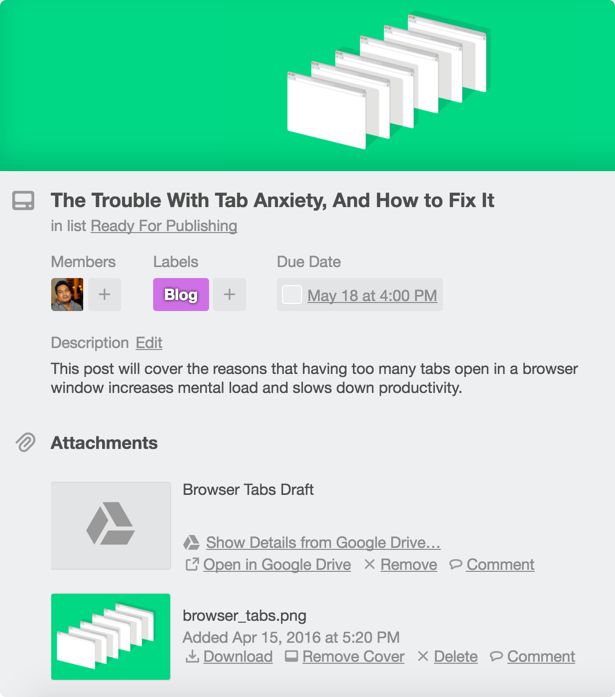
See the big picture, or dive into the details, all on one Trello board.

Everyone knows the status of tasks as cards move across lists to Done.

Organize the essential info from all your apps with Power-Ups.

Seamless collaboration

Infinitely flexible setup means Trello works the way you do.

Get out of email and communicate where the work is getting done.

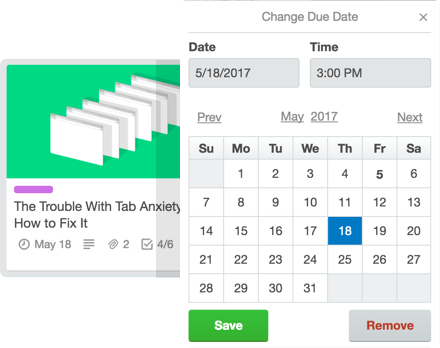
Never miss a deadline with easy-to-set due dates and calendar views.


USE CASES


PROJECT COLLABORATION

Collaborate openly & efficiently without meetings or emails.


KNOWLEDGE MANAGEMENT

Create a single source of truth for accessible information.


SOCIAL, MODERN INTRANET

Connect your team in one place, with blogs, how-to articles, etc.


PROJECT MANAGEMENT FOR TECH

Keep teams aligned & track project status from start to end.


PROJECT COLLABORATION

Collaborate openly & efficiently without meetings or emails.


REMOTE WORK

Lead remote teams and collaborate effectively from any device.


IT

Organize IT documentation & share strategies.


MARKETING & SALES

Improve messaging, target new customers, and sell more products.


STARTUPS

Get started on projects, develop business plans, & scale.


SMALL BUSINESS

Get insights, boost productivity, & move your business forward.


ENTERPRISE

Collaborate effectively, share knowledge, and manage data.


Banking Case Study

Digital Transformation of Management Operations in Banking Industry


Ministry and Government Implementation Study

Atlassian Product Implementation in Government Entity Case Study


Stock Exchange Industry Case Study

Team workload optimization for a client in Stock Exchange industry

Confluence – Knowledge Management

Accomplish more
together

Confluence is your remote-friendly 
team workspace where knowledge  
and collaboration meet.

Why Confluence?

Break down
team silos

An open, connected structure allows information to flow freely among everyone at the organization.

Turn conversations
into action

Built for lasting knowledge so you never lose great ideas or context in a transient notification or chat.

Organize everything
in one place

From quarterly planning docs to new hire blogs, everything lives on Confluence.

Build a culture
of open teamwork

With social features, employees at every level have a voice to contribute, share, and receive feedback.

Confluence

Jira Software is part of a family of products designed to help teams of all types manage work. Originally, Jira was designed as a bug and issue tracker. But today, Jira has evolved into a powerful work management tool for all kinds of use cases, from requirements and test case management to agile software development.

Create a source of truth

Save time by harnessing your teams’ collective knowledge into easy-to-find answers for everyone.

Move work forward

From actionable meeting notes to inspiring project plans, kickstart team participation with a flexible workspace.

Inspire conversation

Encourage all teams – from marketing to engineering – to share announcements, strengthen company culture, and get instant feedback.

USE CASES


PROJECT COLLABORATION

Collaborate openly & efficiently without meetings or emails.


KNOWLEDGE MANAGEMENT

Create a single source of truth for accessible information.


SOCIAL, MODERN INTRANET

Connect your team in one place, with blogs, how-to articles, etc.


PROJECT MANAGEMENT FOR TECH

Keep teams aligned & track project status from start to end.


PROJECT COLLABORATION

Collaborate openly & efficiently without meetings or emails.


REMOTE WORK

Lead remote teams and collaborate effectively from any device.


IT

Organize IT documentation & share strategies.


MARKETING & SALES

Improve messaging, target new customers, and sell more products.


STARTUPS

Get started on projects, develop business plans, & scale.


SMALL BUSINESS

Get insights, boost productivity, & move your business forward.


ENTERPRISE

Collaborate effectively, share knowledge, and manage data.


Banking Case Study

Digital Transformation of Management Operations in Banking Industry


Ministry and Government Implementation Study

Atlassian Product Implementation in Government Entity Case Study


Stock Exchange Industry Case Study

Team workload optimization for a client in Stock Exchange industry

Jira – Business Project Management

Business
project
management software

See all project information at a glance with Jira Core

Manage your projects and keep your team organized.


Manage projects

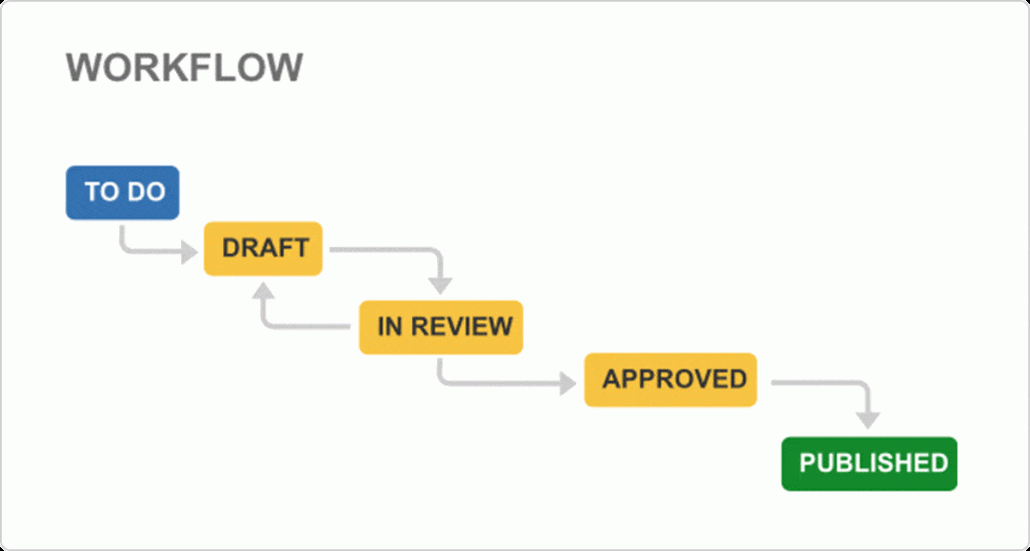
Managing projects and tasks in Jira Core starts with a workflow. Workflows define your process and enable your team to track tasks. Jira Core Cloud instances also have boards that allow you to visualize your workflows and drag and drop tasks from to-do to done. Currently available in cloud offering only.

Monitor details

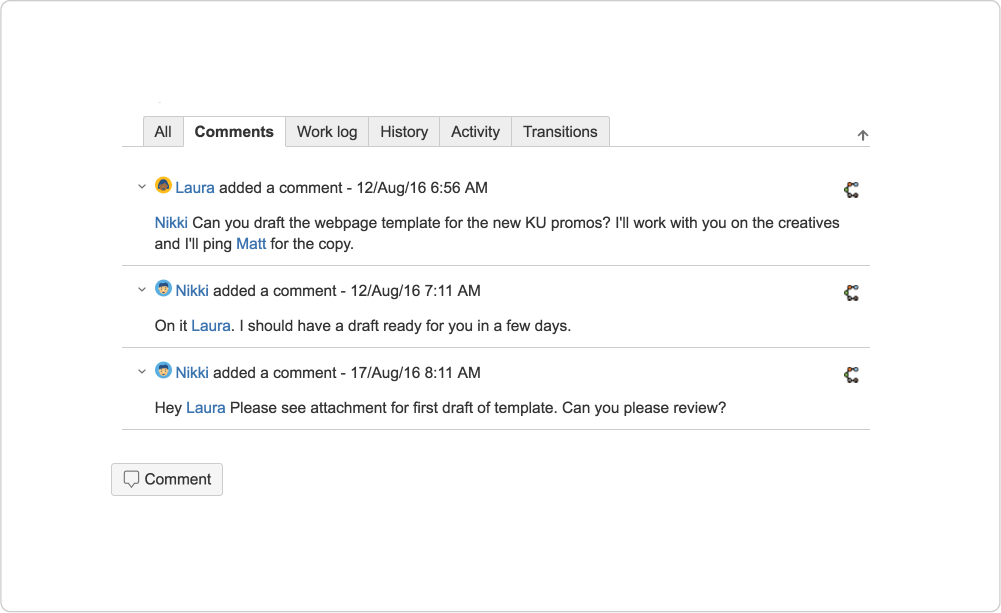
Task management is easier with statuses, comments, and attachments in one place. Everyone knows a project’s details at a glance without having to email or set up a meeting. Plus, with notifications you’ll know when your attention is needed.


Measure performance

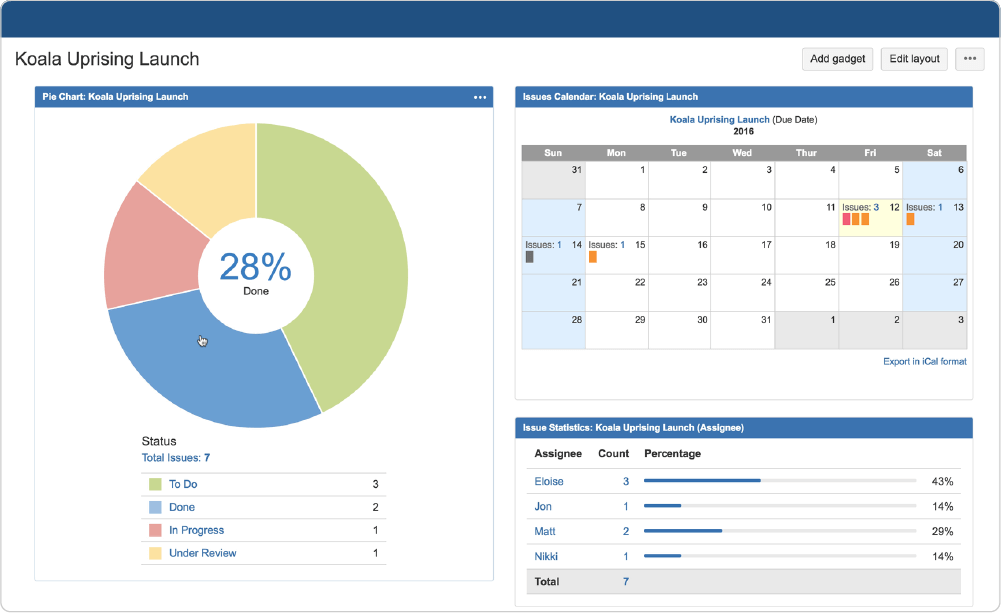
How many tasks are still in progress? Which team member has too much on their plate? Using Jira Core, you can follow the status of your team’s projects in different ways: with a quick overview, customized dashboards, or even a pre-defined report. Add a calendar view and you’re set.


USE CASES


PROJECT COLLABORATION

Collaborate openly & efficiently without meetings or emails.


KNOWLEDGE MANAGEMENT

Create a single source of truth for accessible information.


SOCIAL, MODERN INTRANET

Connect your team in one place, with blogs, how-to articles, etc.


PROJECT MANAGEMENT FOR TECH

Keep teams aligned & track project status from start to end.


PROJECT COLLABORATION

Collaborate openly & efficiently without meetings or emails.


REMOTE WORK

Lead remote teams and collaborate effectively from any device.


IT

Organize IT documentation & share strategies.


MARKETING & SALES

Improve messaging, target new customers, and sell more products.


STARTUPS

Get started on projects, develop business plans, & scale.


SMALL BUSINESS

Get insights, boost productivity, & move your business forward.


ENTERPRISE

Collaborate effectively, share knowledge, and manage data.


Banking Case Study

Digital Transformation of Management Operations in Banking Industry


Ministry and Government Implementation Study

Atlassian Product Implementation in Government Entity Case Study


Stock Exchange Industry Case Study

Team workload optimization for a client in Stock Exchange industry